
Region Administrators and Account Managers
As a region administrator or account manager, you act as the primary decision maker and contact point for GrapeSEED policies within schools and campuses inside your region.
The region administrator is responsible for that region's business, so they are responsible for defining all region policies as well as managing important policy details and oversee school and campus administrators.
You may perform tasks associated with your role as region administrator or account manager from the GrapeSEED Portal.
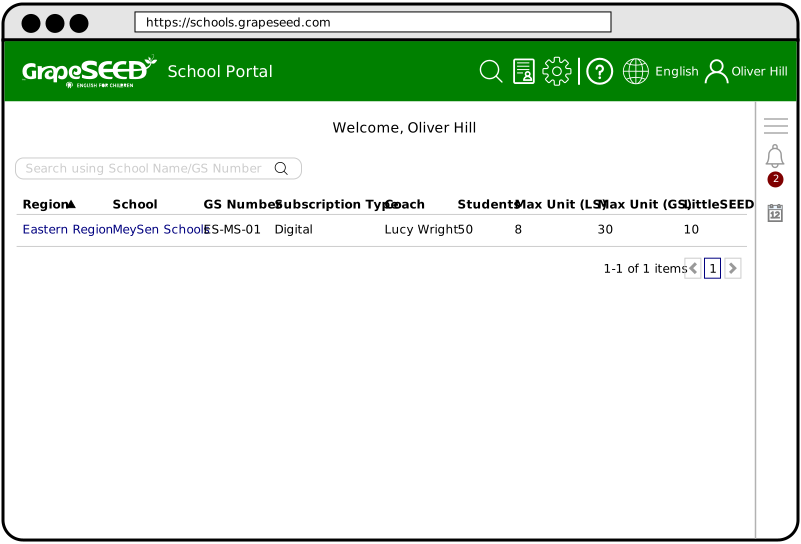
How to Use the GrapeSEED Portal
Welcome to the Region Administrator Guide. From here, you may access quick guides for administrative related tasks in your region.
The region administration tasks are divided into 3 categories:
- Region Management Tasks
- How to View and Manage Your Region
- How to Manage Region Policy
- How to Add a New School to Your Region
- How to Disable a School in your Region
- How to Set Your School's Max Unit
- How to Set Your School's Visitation Limit
- How to Review and Approve Changes
- How to Manage Your Region's School Licenses
- How to Edit and Manage Your Invitation Templates
- How to Create and Manage Your Region's Tags
- How to Manage Terms for Your Regions' Schools
- How to Upload and Manage Custom Region Content
- How to Grant Access to GrapeSEED Connect
- How to Grant Access to Talk Time
- How to Track School/Campus Reward Points
- Region User Management Tasks
- Region Monitoring Tasks
- How to View Your Region's License History
- How to View Your Region's Billing History
- How to View Your Region's Change History
- How to View Bulletin Board and Notifications
- How to Lookup Invitation Codes
- How to View and Manage Region Orders
- How to View School Reports
- How to Perform User Impersonation
- How to Create Surveys
Management Tasks
How to View and Manage Your Region
As a region manager, you will need to manage and update important business policies in your region from time to time, as well as add any missing information about your region, like primary contact emails and other region identification details. Click on this guide to learn how to view and manage your region. read more
How to Manage Region Policy
Region policies enforce how GrapeSEED systems behave within your region. Policy is a direct result of your business model, and if any change is made to your business model, you may need to make changes to your policies from the Schools.GrapeSEED website. Click on this guide to learn how to manage your region's policies. read more
How to Add a New School to Your Region
Whenever a new school would like to add GrapeSEED to their curriculum, or evaluate GrapeSEED for a short period of time, you need to add a new school to your region. Click on this guide to learn how to add a new school to your region. read more
How to Disable a School in your Region
If a school stops doing business with GrapeSEED, or was suspended because of any reason, you must disable that school. We recommend you disable instead of deleting a school in case they decide to start doing business with GrapeSEED again, and to keep transaction records for future use. read more
How to Set Your School's Max Unit
When you add a new school to your region, you must set the school's 'Max Unit'. The 'Max Unit' is the maximum unit of GrapeSEED or LittleSEED curriculum that schools in your region may teach. Max Unit is determined by the school contract. If any changes are made to the contact, you can set and edit the Max Unit from the Schools.GrapeSEED website. Click on this guide to learn how to set Max Units. read more
How to Set Your School's Visitation Limit
Coach Visitations and Lesson Videos Analyses (LVAs) are important tools for assessing teacher performance in your region and providing constructive feedback. You may designate a limit on coach visits and LVAs per academic year easily from the Schools.GrapeSEED website. Click on this guide to learn how to set your region's Visitation Limit. read more
How to Review and Approve Changes
When you add a new school to your region, there is an agreed upon model/business expectation defined in the school contract. Whenever a school makes changes they must ensure the changes are in line with the school contract. As the region manager you will be notified of these changes, and must review and approve them. Click on this guide to learn how to review and approve changes to schools in your region. read more
How to Manage Your Region's School Licenses
Typically, a school or campus administrator will manage licenses for a school in your region. However, you may enable a policy that disables school and campus admins from being able to manage licenses. In that case, you must manage licenses for schools in your region. Click on this guide to learn how to manage licenses for schools in your region. read more
How to Edit and Manage Your Invitation Templates
As a region administrator, you must invite users to different roles within the GrapeSEED system. The invitations will vary from region to region, and by user type, so it's important to manage and edit your templates to ensure they are appropriate for your region. You can edit and manage your region's invitation templates from the Schools.GrapeSEED website. Click on this guide to learn how to create and manage your region's invitation templates. read more
How to Create and Manage Your Region's Tags
As a region administrator you may create and manage tags for entities and users within your region. These include schools and teachers. Tagging schools and teachers allows internal users to track designations or any other details they may wish to help better identify schools and teachers. Click on this guide to learn how to create and manage your region's tags. read more
How to Manage Terms for Your Regions' Schools
School terms are the dates of time schools in your region are open and have GrapeSEED classes in session. As a region administrator you may create and designate specific terms for your region defined by start and end dates. Click on this guide to learn how to create and manage your region's terms. read more
How to Upload and Manage Custom Region Content
As a region administrator you may upload and manage custom content for users in your region to access, view, and download on the content website. This content includes audio, video, and PDF files. Click on this guide to learn how to create and manage your region's custom content. read more
How to Grant Access to GrapeSEED Connect
Only region administrators have the ability to grant access to GrapeSEED Connect. In order to do this, you first need to navigate to the user page for the teacher you want to grant access to and then check the “Grant GrapeSEED Connect Access” checkbox on their user page. read more
How to Grant Access to Talk Time
Only region administrators have the ability to grant access to Talk Time. In order to do this, you first need to navigate to the Talk Time Access page for your region and then adjust permissions as you see fit. read more
How to Track School/Campus Reward Points
Region Admin and the Account Managers for the region and school respectively can award, deduct, and track “Points” for schools. This can be used however the region sees fit, for whatever purposes the region chooses, such as calculating discount eligibility. read more
Personnel Management Tasks
How to Invite Region Administrators
As a region admin, there are multiple responsibilities that you need to carry out within the GrapeSEED system, like managing policies, schools, users, etc. Based on your region's needs, it's advised that you share this role among multiple users as co-admins. To do so, you must invite a user to be a region admin, like a sales or marketing department head within your region. Click on this guide to learn how to invite region administrators. read more
How to Invite an Account Manager or Coach
You must invite a coach or trainer to teach the GrapeSEED program to teachers in new schools in your region. Depending on your region's policy, you may also invite account managers to your school. Account manager's aren't required. However, if you do need an account manager, you may add one to your school from the School.GrapeSEED website.
Click on this guide to learn how to invite a coach or account manager to schools in your region from the Schools.GrapeSEED website. read more
How to Invite A School Administrator
The School administrator is the primary person for the school itself. They are responsible for managing GrapeSEED implementation and day to day operation within the school. When you add a new school to your region you must invite a user to act as the school administrator. Click on this guide to learn how to invite a school administrator to your school from the Schools.GrapeSEED website. read more
How to View, Manage, and Help your Users
As a region administrator, you can assist users within your region with their technical problems from the Schools.GrapeSEED website. You can help users reset their password, request a device override limit update, and update their email address. You can disable users, view their device list, delete devices, etc. Click on this guide to learn how to view, manage, and help your region's users. read more
Monitoring Tasks
How to View Your Region's License History
Every school in your region follows the billing period as defined at the region level. As a region administrator, you can view the license usage of each school in your region during different billing periods. You will also be able to see details like license count, student count, and any changes made to your licenses. Click on this guide to learn how to view license history for schools in your region. read more
How to View Your Region's Billing History
Every school in your region follows the billing period as defined at the region level. As a region administrator, you can view billing for different periods of time for schools in your region. Click on this guide to learn how to view your region's billing history. read more
How to View Your Region's Change History
There are quite a bit of things users within your region can edit with regard to your schools or campuses, like classes, class times, unit plans, student count, etc. The 'Change History' form displays every change made to campuses and schools in your region in an easy to read table. Click on this guide to learn how to view change history for schools in your region. read more
How to View Bulletin Board and Notifications
The bulletin board displays important information, like notifications, and upcoming events in your region. You may also review and approve notifications created by users in your region from the bulletin board. Click on this guide to learn how to view the Bulletin Board and manage notifications. read more
How to Lookup Invitation Codes
GrapeSEED parents will often lose their invitation code before they can confirm and activate their account. When this happens, you need to lookup the invitation code. Typically, users for schools in your region will handle invitation code lookups, but if they can't be reached you can lookup invitation codes for users. Click on this guide to learn how to lookup invitation codes. read more
How to View and Manage Region Orders
As a region administrator, you may want to track GrapeSEED material orders made by schools in your region to ensure that they have the materials needed to execute the GrapeSEED program. You can view and fulfill classroom material orders from the Schools.GrapeSEED website. Click on this guide to learn how to view and manage your region's orders. read more
How to View School Reports
The Reports.GrapeSEED website allows you to monitor important data about your school or region that is automatically collected and tracked for easy access. This includes your school count, student count by unit, license history, digital REP usage and log. Alongside the data, you can use analytics and view training video questionnaires and statistics. read more
How to Perform User Impersonation
Sometimes, users will have issues accessing certain features of the portal, mainly due to permission problems. User impersonation allows region admins to assist by taking the role of that user so they can see their problem from their point of view and make permission adjustments. Click on this guide to learn how to impersonate users. read more
How to Create Surveys
Internal surveys allow you to gather important information about your region, like on teachers, classes, students, etc. Region Admins can now create these internal surveys for their region. Click on this guide to learn how to create surveys for your region. read more